
Manage subscriptions
Use ERPNext Subscription Plans with Stripe Checkout to start recurring billing and reconcile later billing cycles.
Sync a Subscription Plan to Stripe
Complete the Stripe setup, subscribe to the subscription events in Set up webhooks, and create the Item and Customer required by your ERPNext billing workflow.
- Open Stripe Settings.
- Enable Sync Subscription Plan Price to Stripe and save.
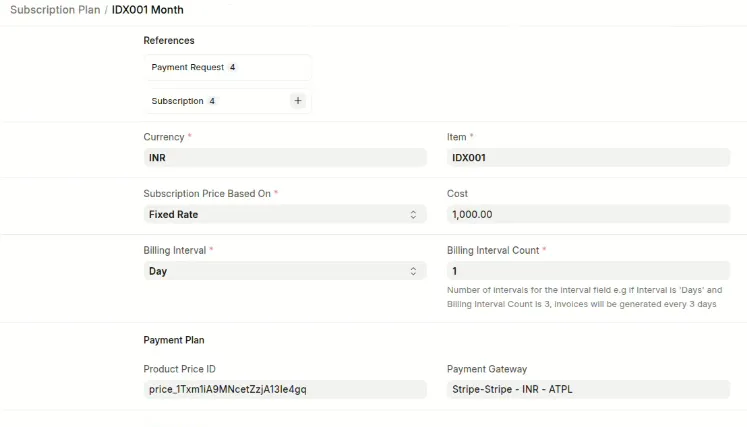
- Open or create a Subscription Plan.
- Set its Item, billing interval, currency, rate, and Stripe Payment Gateway Account.
- Save the Subscription Plan.
ERPNext creates a Stripe Product and Price and stores the Stripe price identifier in the Subscription Plan. If the plan's supported price fields change, ERPNext creates a new Stripe Price and archives the previous price.
Start a subscription
- Create an ERPNext Subscription for the customer.
- Add the Stripe-enabled Subscription Plan.
- Create a Payment Request against the Subscription.
- Select the Stripe Payment Gateway Account.
- Submit the Payment Request and send its Payment URL to the customer.
- Ask the customer to complete Stripe Checkout.
Starting a subscription through Stripe Checkout
After checkout, ERPNext links the Stripe customer and subscription identifiers to the ERPNext Subscription.
What happens each billing cycle
- Stripe creates and pays the recurring invoice.
- Stripe sends
invoice.paidto ERPNext. - ERPNext finds or generates the Sales Invoice for that subscription period.
- ERPNext creates and submits a Payment Entry against the Sales Invoice.
If Stripe sends invoice.payment_failed, ERPNext adds a comment to the linked Subscription. Your team must follow its normal collection or dunning process.
Verify the subscription
- Confirm that the ERPNext Subscription contains a Stripe subscription identifier.
- Confirm that the related Stripe Webhook Log records are Processed.
- Confirm that each paid billing period has one Sales Invoice and one submitted Payment Entry.
Troubleshooting
- If a Subscription Plan has no Stripe price identifier, confirm that Sync Subscription Plan Price to Stripe is enabled and that the plan has a Stripe Payment Gateway Account.
- If checkout does not create a Stripe subscription, inspect the Checkout event in Stripe and the matching Stripe Webhook Log.
- If a recurring payment does not create an invoice or Payment Entry, confirm that the ERPNext Subscription has a Stripe subscription identifier and that
invoice.paidwas processed. - If the webhook is Ignored, confirm that Stripe's subscription is linked to the expected ERPNext Subscription and that the billing period is not already settled.