
The Unicommerce Integration app keeps a Unicommerce (Uniware) account and ERPNext in step with each other. Orders captured on your Unicommerce channels flow into ERPNext as complete accounting documents, inventory levels are pushed back to Unicommerce, and goods receipts recorded in ERPNext are posted to Unicommerce as inventory adjustments - all without duplicate data entry.
What the integration handles
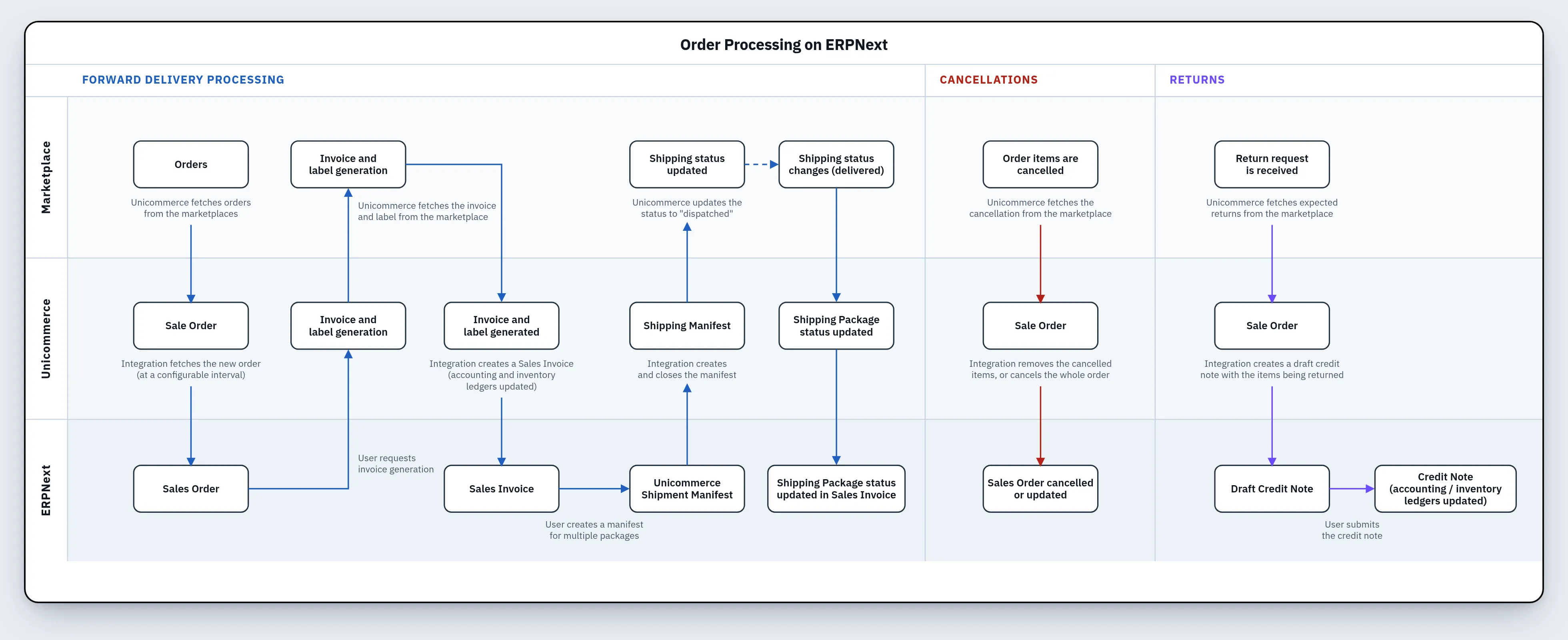
- Sales orders: sales orders from your Unicommerce channels are pulled on a schedule and created as ERPNext Sales Orders.
- Invoicing and dispatch: as an order is invoiced and shipped in Unicommerce, ERPNext creates the corresponding Sales Invoice and Delivery Note.
- Item catalogue: Unicommerce SKUs are brought in as ERPNext Items, and new ERPNext Items can optionally be pushed out to Unicommerce.
- Inventory: ERPNext stock levels are published to the mapped Unicommerce facilities on a schedule.
- Goods receipts (GRN): a goods receipt recorded in ERPNext is posted back to Unicommerce as a batched inventory adjustment.
- Cancellations and returns: full and partial cancellations, and customer-initiated returns, are reflected in ERPNext as amendments and credit notes.
Before you begin
You will need the following in place:
- A working ERPNext installation.
- The Ecommerce Core app must be installed since Unicommerce Integration depends on it.
- A Unicommerce (Uniware) account with an API-enabled user.
- The Client ID issued for your Unicommerce tenant (commonly
my-trusted-client).
The repository for app is hosted on GitHub: Unicommerce
How the pieces fit together
At a high level, data moves in both directions on independent schedules:
Unicommerce  ─────────────▶  ERPNext
  channel order                Sales Order
  invoice raised               Sales Invoice
  order dispatched             Delivery Note

ERPNext      ─────────────▶  Unicommerce
  stock change                 inventory level (per facility)
  goods receipt (GRN)          inventory adjustment
Authentication is handled for you. The connector uses the OAuth password grant to exchange your username and password for an access token and a refresh token, and then automatically renews the access token as it expires.