
Cancellations and Returns
Orders do not only move forward. Unicommerce cancellations and returns are reflected in ERPNext automatically, as amendments to the Sales Order or as draft Credit Notes.
Cancellations
Cancellations are picked up by the hourly status job and applied to the linked Sales Order:
| Kind | What happens in ERPNext |
|---|---|
| Full cancellation | The Sales Order is cancelled. |
| Partial cancellation | The cancelled lines are removed from the Sales Order and the remaining lines are kept. |
Cancellations are handled before invoicing. Once an order has been invoiced, a cancellation in Unicommerce is treated as a return instead, because the accounting entry already exists.
Returns
A return creates a Credit Note in draft. It is never submitted automatically, so someone can check the goods and the amounts before it posts to the ledger.
| Type | Meaning | Scope |
|---|---|---|
| RTO | Return To Origin. The courier could not deliver, so the whole package comes back. | Always the full package. |
| CIR | Customer Initiated Return. The customer sent goods back. | Full or partial, depending on what was returned. |
The Credit Note is raised against the original Sales Invoice for that shipping package, and each line is booked into the Return Warehouse set on the facility's row in Warehouse Mapping. If that row has no Return Warehouse, the item's original warehouse is used instead, which means returned stock lands back in your selling warehouse. Set a Return Warehouse per facility if you want returns quarantined.
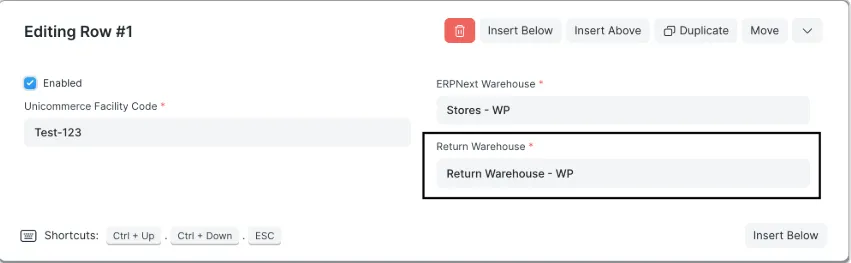
Set Return Warehouse on each facility's mapping row so returned stock is booked separately.
Note: A duplicate is not created if a return Credit Note already exists for the same shipping package, so a repeated sync is safe.
Order status on the Sales Order
Every synced Sales Order carries the current Unicommerce state in its Unicommerce Details section.
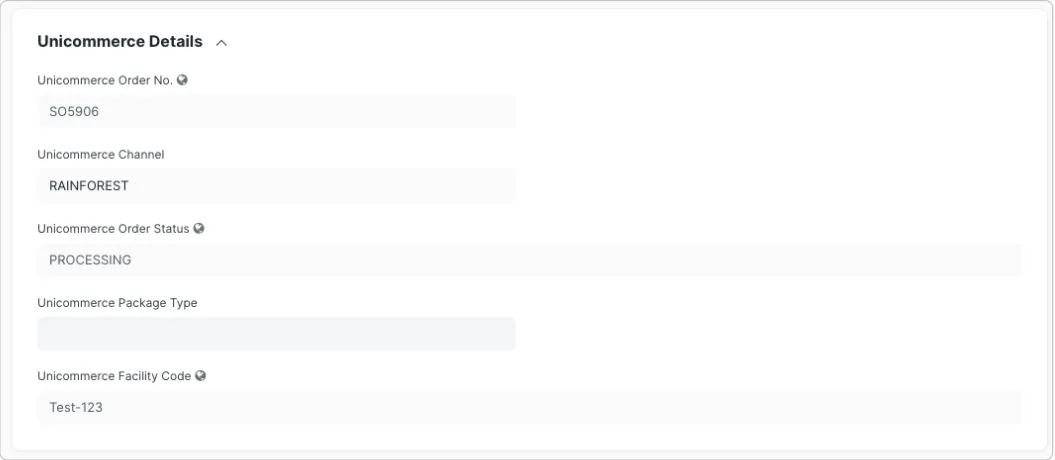
Unicommerce Details on a Sales Order: order number, channel, current status, and facility code.
The hourly job refreshes both the order status and the shipping package status for orders inside the Sync Order Status Days window, so the ERPNext record reflects what Uniware currently shows without opening Uniware.