
Inventory Sync & Warehouse Mapping
Inventory synchronisation publishes ERPNext stock levels to Unicommerce, so your marketplace listings reflect the quantity you actually hold.
Enabling the sync
In the Inventory Sync Settings section:
- Tick Enable Inventory Sync.
- Set the Inventory Sync Frequency (In minutes).
- Complete the Warehouse Mapping table described below.
The Warehouse Mapping table
Each row maps one Unicommerce facility to one ERPNext warehouse:
| Column | What to enter |
|---|---|
| Unicommerce Facility Code | The facility code exactly as it appears in Uniware. |
| ERPNext Warehouse | The warehouse whose stock feeds this facility. |
| Enabled | Tick to include this facility in the synchronisation. |
| Return Warehouse | The warehouse where returned stock and credit-note stock are booked. |
| Company Address | The address used on documents raised for this facility. |
| Dispatch Address | The dispatch-from address for this facility. |
Only rows marked Enabled are synchronised, so you can prepare a facility's mapping before it goes live.
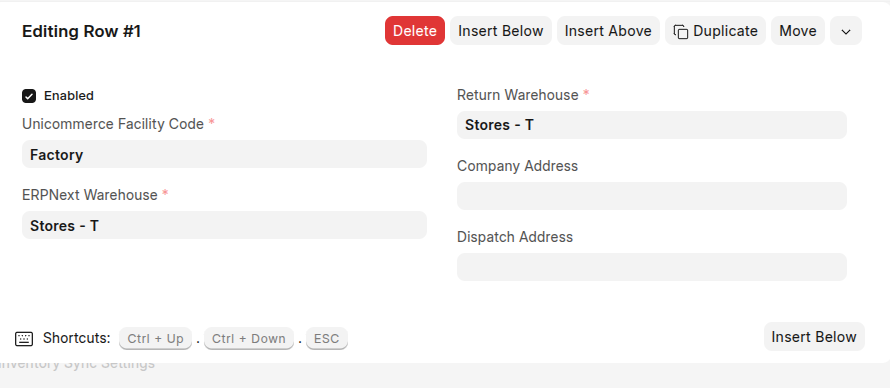
A Warehouse Mapping row: mapping a Unicommerce facility to an ERPNext warehouse.
Limits you should know about
| Limit | Detail |
|---|---|
| DEFAULT shelf only | Quantities are always published to the shelf named DEFAULT in each facility. The integration does not read or write any other shelf, so shelf-level stock kept in Uniware is not represented in ERPNext. |
| Whole numbers only | Quantities are truncated to integers before they are sent. An item held in a fractional UOM reaches Unicommerce rounded down, so it is not suitable for stock measured in fractions. |
| Group warehouses are skipped | A mapping that points at a group warehouse cannot be used for stock transactions and is passed over. Always map a leaf warehouse. |
Tip: A frequency between 15 and 60 minutes suits most stores. Shorter intervals put steady load on both systems for little benefit, since marketplace listings do not refresh instantly either.
How the push works
ERPNext stock ledger changes
  → scheduled inventory sync (every N minutes)
  → current quantity is calculated for each mapped facility
  → the quantity is published to Unicommerce
  → the Last Inventory Sync timestamp is updated
The Sync Status section reports Last Inventory Sync and Last Order Sync, giving you a quick confirmation that both schedules are running.
Note: A facility with no mapped ERPNext warehouse is never touched. If stock is not reaching Unicommerce, verify that the facility has an Enabled row pointing at the correct warehouse.