
Keep stock levels in sync
In the Inventory Sync section of Shopify Setting, configure ERPNext to push stock levels back to Shopify so your storefront always shows the latest inventory availability.
Turn It On
- Enable Update ERPNext Stock Levels to Shopify to sync inventory quantities from ERPNext to Shopify.
- Click Fetch Shopify Locations to retrieve the list of locations configured in your Shopify store.
- Map each Shopify Location to the corresponding ERPNext Warehouse under Shopify Warehouse Mapping.
Once configured, stock updates from ERPNext will be reflected in the mapped Shopify locations.
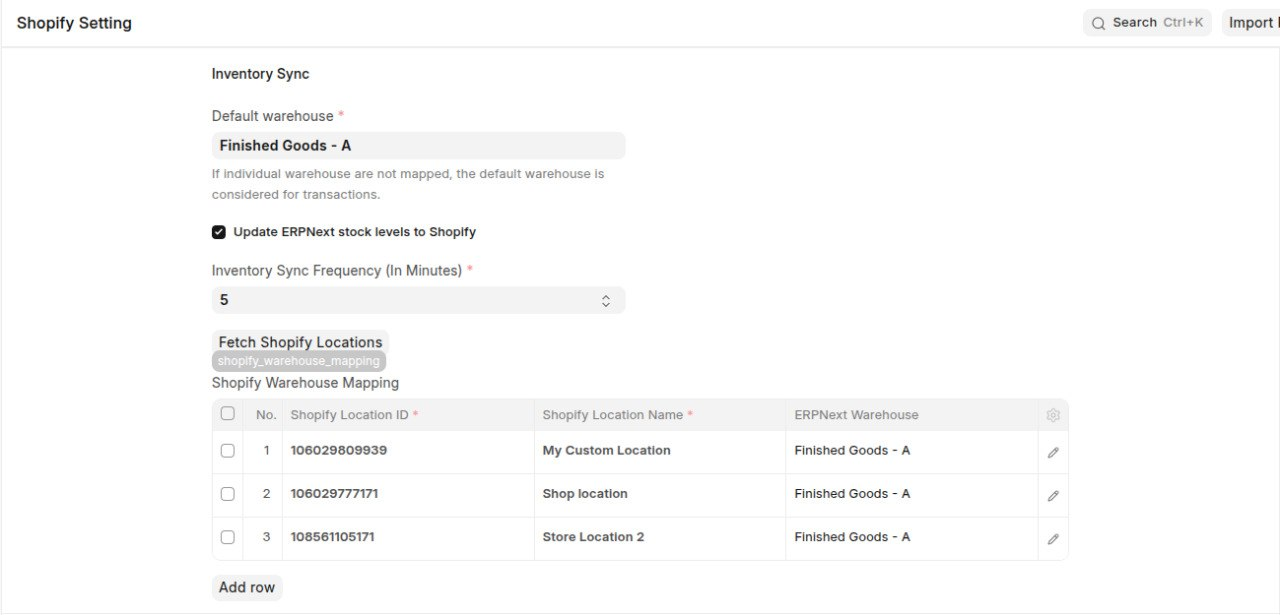
Every Shopify Warehouse Mapping row must have an ERPNext Warehouse selected. Saving the configuration is blocked until all warehouse rows are properly mapped.
How Often It Runs
The Inventory Sync process runs automatically based on the Inventory Sync Frequency (In Minutes) setting. The default frequency is 60 minutes.
During each sync run:
- It checks for stock movements made after the Last Inventory Sync timestamp.
- Updates the corresponding stock quantities in Shopify.
- Advances the Last Inventory Sync timestamp for the next sync cycle.
Tip: When enabling inventory sync for the first time, the initial sync fetches stock changes from the beginning. This first push may take longer than regular sync runs.
Walkthrough
Troubleshooting
Inventory Isn't Syncing
Symptom:
Inventory quantities in Shopify do not match the stock available in ERPNext.
Possible Causes and Resolutions
1. Inventory Sync Is Disabled
Resolution:
- Enable Update ERPNext Stock Levels to Shopify in Shopify Setting.
2. Warehouse Mapping Is Missing
Resolution:
- Click Fetch Shopify Locations.
- Map every Shopify Location to an ERPNext Warehouse in Shopify Warehouse Mapping.
- Ensure every mapping row has an ERPNext warehouse before saving.
3. Inventory Sync Has Not Run Yet
Resolution:
- Verify the Inventory Sync Frequency (In Minutes) setting.
- Check the Last Inventory Sync timestamp to confirm the most recent sync.
- Remember that the first synchronization performs a full inventory update and may take longer than subsequent runs.