
Configure order sync
In the Order Sync Settings section, configure the Naming Series and enable the ERPNext documents that should be created automatically based on the Shopify order status.
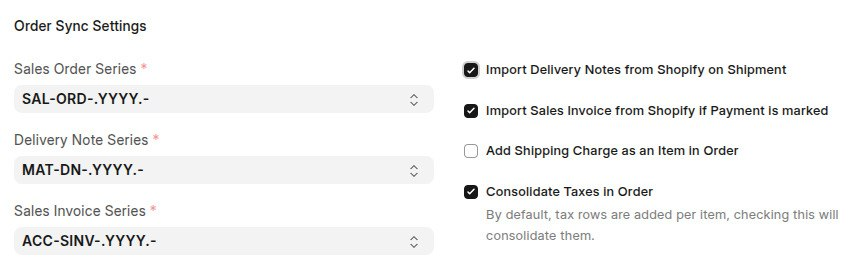
Naming series
- Sales Order Series – Defines the Naming Series used for Sales Orders created from Shopify orders.
- Sales Invoice Series – Defines the Naming Series used for Sales Invoices created from Shopify Sales Orders.
- Delivery Note Series – Defines the Naming Series used for Delivery Notes created from Shopify Sales Invoices.
Automatic document creation
- Import Delivery Notes from Shopify on Shipment – Automatically creates a Delivery Note when a Shopify order is fulfilled. Configure the Delivery Note Series to define the document numbering.
- Import Sales Invoice from Shopify if Payment is Marked – Automatically creates a Sales Invoice when a Shopify order is marked as paid. Configure the Sales Invoice Series to define the document numbering.
Leave either option disabled if you prefer to create the corresponding ERPNext document manually and import only the Sales Order.
Walkthrough
Last updated 3 weeks ago
Was this helpful?